GSoC 2026 Mid-Term Report: CircuitVerse Mobile
Hello everyone,
This is my mid-term blog for Google Summer of Code 2026 with CircuitVerse. For the first half of GSoC, I have been working on the CircuitVerse mobile app and trying to build a better foundation for the upcoming features.
The last few weeks were mostly about understanding the project properly, discussing things with mentors, and slowly moving from setup work to feature work.
Getting Started
I started by setting up the project locally and getting familiar with the codebase. Since the app depends on the Flutter ecosystem, one of the early tasks was to update dependencies and fix the issues that came up after the upgrade.
This was not just a simple version bump. The Android platform had accumulated a fair amount of drift — the SDK, Gradle, AGP, and Kotlin plugin versions were all behind, and upgrading them together required careful ordering to make sure nothing broke. I worked through the compatibility matrix and landed on a stable combination before moving on.
#530 — Fix: Upgrading Deprecated Dependencies Versions (Android)
Migrated the Android build toolchain to a modern, stable baseline:
- Android SDK: 35 → 36
- Gradle: 8.10.2 → 8.14
- Android Gradle Plugin: 8.7.0 → 8.11.1
- Kotlin Gradle Plugin: 1.9.25 → 2.2.20
#593 — chore: upgraded dependencies
Followed up with a broader Flutter-side dependency upgrade pass:
- Bumped minimum iOS deployment target to iOS 13.0
- Updated the CI/CD toolchain to the latest Flutter stable release
- Fixed a dropdown initialization bug affecting assignments, projects, and notifications forms
- Simplified the in-app tutorial/showcase flow
This helped me understand the project structure better and made the development setup smoother for the work ahead.
Planning the Work
After the initial setup, we discussed the larger goals for the project. Some of the main areas we talked about were authentication, Firebase integration, Kotlin DSL migration, desktop support, and the Interactive Book.
These discussions helped me get a clearer idea of what needed to be done and how the different parts of the project connect with each other.
Cleaning Up the Repository
While working through the build setup, I also noticed that auto-generated Flutter plugin files and platform build artifacts were being tracked in version control. This causes noise in diffs and can cause conflicts between developer environments, so I cleaned these up.
#578 — Removed auto-generated plugin files and added them to .gitignore
Removed Flutter-generated plugin registration files from version control and added them to .gitignore. These are regenerated automatically on each build and should never be committed.
#619 — Modified gitignores for modern Flutter builds
Extended the ignore rules to cover additional build artifacts across platforms:
- Android native build artefacts
- iOS build and ephemeral Flutter artifacts
- Project-wide coverage outputs and temporary build files
Authentication
Authentication has been one of the important parts of the project so far. I spent time understanding how CircuitVerse handles login on the backend and how the mobile app should connect with it.
We also discussed using Firebase Authentication for the mobile app. I worked on the initial setup and also explored Google Sign-In configuration using the Android package name and SHA-1 fingerprint.
I also made some initial authentication screen designs in Figma so we could discuss the flow before moving too deep into implementation.
Interactive Book
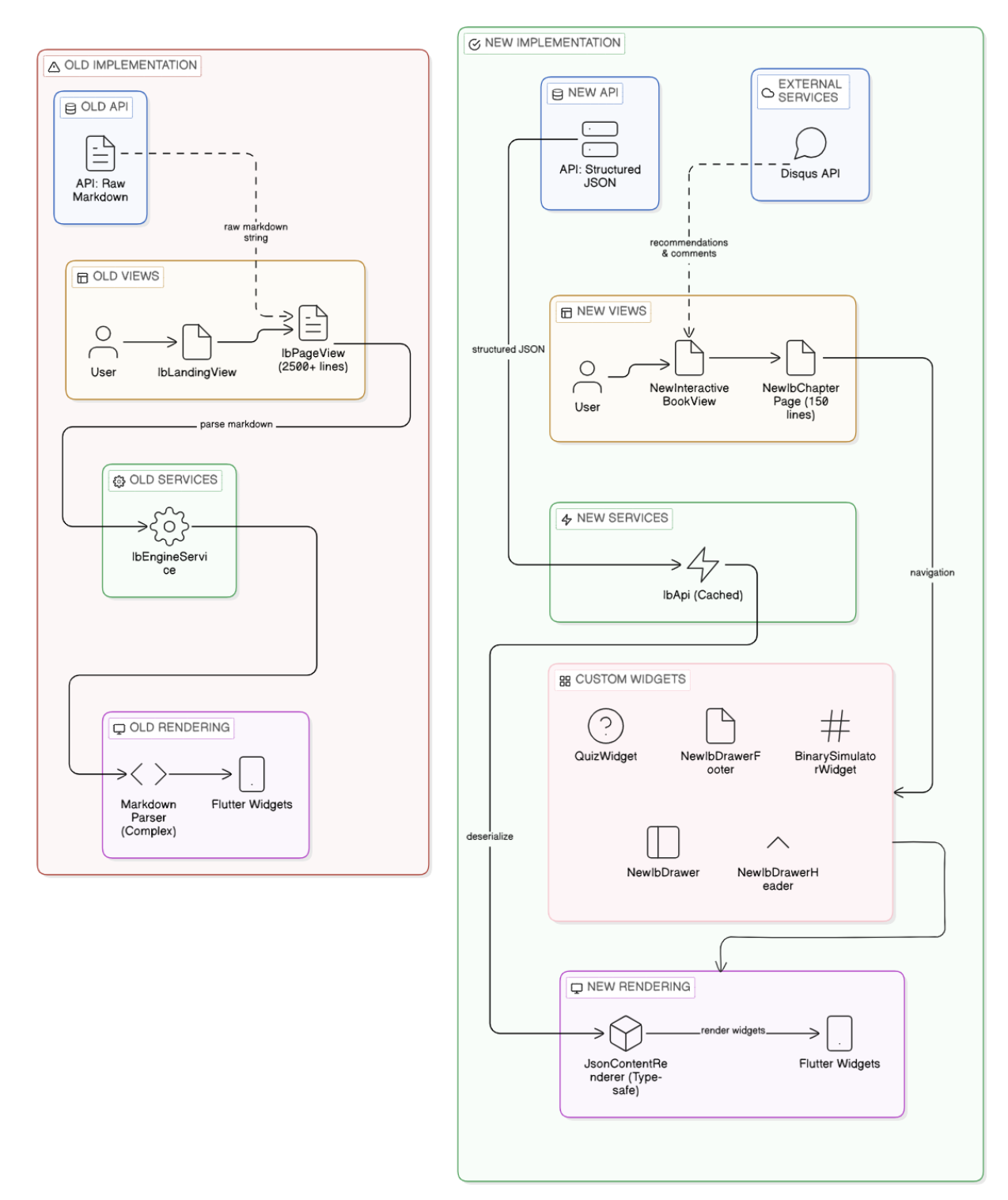
The Interactive Book has been the most substantial part of my work this half. The existing implementation had several limitations — it parsed raw markdown, had no proper typing, and was hard to extend. I redesigned it from the ground up.
#624 — Feat: Interactive Book V2 - Renderer, Home Screen, Navbar and Chapter 1
This PR introduces the core of the new Interactive Book experience:
- Home Screen — Shows the book overview, a features grid, and a getting started section to orient new users before they dive in
- Drawer/Navbar — Makes an API call to fetch the chapter and subchapter structure, then renders it as a navigable drawer. This means the nav structure stays in sync with the backend automatically
- Renderer — The central class that fetches chapter data from the API and compiles it into UI widgets. This replaces the old markdown parser with a structured, typed approach
- Chapter 1 widgets — The first chapter is fully rendered with the new widget system, including a Pop Quiz, an 8-bit binary converter, and a reusable table component
Here’s a summary of the architectural shift this enables:
| Area | Before | After |
|---|---|---|
| API | Markdown parsing | Structured JSON |
| Rendering | Complex parser | Simple, reliable renderer |
| UI | Basic | Material 3 |
| Features | — | Quizzes, binary converter, tables |
| Architecture | Monolithic | Modular components |
| Type Safety | Strings | Typed models |
While working on this, I also explored Server-Driven UI to keep the app flexible enough so that new content can be rendered without requiring changes deep inside the Flutter code.
Mock Data
To test the Interactive Book flow without depending completely on backend APIs, I also worked on scripts to generate mock data. This made it easier to try out different content structures and continue frontend work in parallel.
CI/CD
Towards the end of the first half, I started looking at the CI setup. The existing workflow was a single monolithic file, which made it difficult to understand failures and slow to maintain.
#632 — Divided CI to Android, iOS and Web
Split the CI into three separate, focused workflows:
- Android — Builds the APK and produces downloadable release artifacts on successful pushes
- iOS — Dedicated iOS build pipeline
- Web — Web builds with artifact publishing for preview and validation
Each workflow runs on pushes and pull requests to the main development branches, with caching and dependency setup improvements to speed up build times.
Work Done So Far
| PR | Title | Status |
|---|---|---|
| #530 | Fix: Upgrading Deprecated Dependencies Versions (Android) | Merged |
| #578 | Removed auto-generated plugin files and added them to gitignore | Merged |
| #593 | chore: upgraded dependencies | Merged |
| #619 | Modified gitignores for modern Flutter builds | Merged |
| #624 | Feat: Interactive Book V2 - Renderer, Home Screen, Navbar and Chapter 1 | Open |
| #632 | Divided CI to Android, iOS and Web | Open |
What I Learned
The first half of GSoC helped me understand how important planning is before writing code. I also learned a lot about working in an existing codebase, discussing approaches before implementation, and breaking larger features into smaller parts.
Working with mentors and getting feedback regularly has been really helpful.
Next Steps
For the second half, I will continue working on the authentication flow and Interactive Book integration. The remaining chapters of the Interactive Book need to be wired up to the new renderer, and the auth flow needs to be completed with Google Sign-In.
Alongside that, I want to keep pushing on the broader product goals we discussed for the app:
- Better logging and debugging support
- Documentation improvements for the project and workflows
- Dart issue cleanup, linting, and code quality checks
- Test coverage improvements
- A caching layer for better performance
- Deep linking support
- Push notifications
- Play Store deployment
- Localization
- Search improvements
- Splash screen work
- Further state management and UI refinements, including the remaining Material 3 and Riverpod-related updates
I am looking forward to continuing the project and improving the CircuitVerse mobile app further.
See Also
- Project 7: Flutter Upgrade - GSoC 2025 Final Report
- Client-Side Verilog Synthesis for CircuitVerse | GSoC 2026 | Phase 1 Report
- Enterprise Organizations for CircuitVerse | GSoC 2026 | Phase 1 Report
- Migrate to View Components & Improve Search Experience: GSoC 2025 Final Report
- Project 1: Circuit Visibility Boosting & Platform Performance Enhancement - GSoC 2025 Final Report