Project 7: Flutter Upgrade - GSoC 2025 Final Report
Introduction
Greetings to the CircuitVerse community, and a warm welcome to those visiting for the first time.
I am Yashvant Singh (JatsuAkaYashvant), a pre-final year undergraduate student at the National Institute of Technology Hamirpur. I am someone who loves to explore new ideas and challenge myself to go beyond my limits. Over the past few years, this curiosity has led me into the world of open source and development, where I continue to learn from the best and contribute wherever I can.
Interestingly, my GSoC journey with CircuitVerse began in a rather unexpected way. I first came across the project through a YouTube video by Devansh Dixit, titled as: “How I cracked GSoC in 6 months | Real Documentation.” That video not only introduced me to Google Summer of Code, but also to CircuitVerse as a platform that makes learning digital circuits accessible to students everywhere. What started as curiosity soon turned into determination, I wanted to contribute to this ecosystem that helps learners understand circuits in such a simple yet powerful way.
This summer, I had the privilege of working with CircuitVerse through Google Summer of Code 2025, focusing on upgrading and enhancing the CircuitVerse Mobile App. My aim was to bring the mobile experience closer to the web version while making it smoother, more reliable, and more accessible for learners worldwide.
In this final report, I will share my journey what I built, the challenges I faced, the improvements introduced, and the road ahead for the mobile app.
Project Overview
Many of you already know CircuitVerse through its powerful web platform, which has helped countless students and educators learn digital circuits in an interactive way. But a question often arises: why do we need a mobile app when the web app is already so good?
The answer is simple: not every learner has constant access to a laptop. For many students, a mobile phone is the most accessible device they own. By bringing CircuitVerse to mobile, we make sure that learning circuits is not limited by where you are or what device you have.
With the CircuitVerse Mobile App, students and hobbyists alike can now explore, design, and learn on the go, whether in classrooms, buses, libraries, or even at home. The idea is to take this wonderful learning resource and make it available in every pocket where the web might not always reach.
This project has been about more than just fixing bugs or redesigning screens; it’s about making digital circuit education more inclusive, accessible, and reliable for a global community of learners.
Better Localization & Image Support
One of the first things I tackled was making the app more welcoming for learners in different languages. Until now, CircuitVerse Mobile relied on an older system for translations, which made updates tricky and limited the reach of the app.
With the new localization setup, the app is ready to support multiple languages more easily. For now, you’ll find English and Hindi, but adding more languages in the future will be much smoother. This means CircuitVerse can grow with its community, whether that’s students learning in classrooms across India, or future contributors who want to make the app available in their own regional languages.
Along with this, I improved how images are handled inside the app.These may sound like small fixes, but they set a strong foundation for something bigger: a truly global, accessible CircuitVerse app.
Modernized Codebase for Multilingual Support
I thought this was going to be a short and simple PR. Honestly, I assumed the codebase was already modernized for multi-language support. But when I ran the app after setting things up… surprise! It wasn’t. That led to a funny little “lol” moment in front of my mentor Hardik.
What looked small at first actually became the foundation for true multilingual support in CircuitVerse Mobile. This work made sure that all parts of the app not just a few screens, are ready for multiple languages.
Language Switching in the App
The biggest change you’ll notice is a language selection menu right inside the app’s sidebar. With just a tap, users can now switch between English and Hindi. The menu even shows a small radio button next to the selected language, so you know which one is active.
And here’s the neat part: the whole app reacts instantly. Switch languages, and the text across the app updates right away, no restarts, no waiting.
(App drawer showing English and Hindi options with a radio button)
A Fully Localized Experience
Until now, a lot of the app still used hardcoded English text. That meant some dialogs, notifications, or error messages didn’t feel local at all. Now, everything has been refactored to use proper localization.
So whether you’re logging in, checking a project, or browsing a book page, the app speaks your language.
Under the Hood Improvements
Behind the scenes, the localization system was rebuilt in a cleaner, more scalable way:
- A new Language Controller manages the app’s language state.
- Localization keys are consistently named and organized.
- Widgets are rebuilt properly when the language changes, so the app stays smooth.
- Tests were updated to handle multiple languages, making the system more reliable for the future.
All of this means adding new languages down the line will be much easier. Today we start with English and Hindi, but tomorrow, this same setup can welcome learners in Tamil, Bengali, Spanish, or whichever language contributors bring in.
Why This Matters
CircuitVerse has always been about making learning electronics accessible. But accessibility isn’t just about free access, it’s also about language. Many students don’t learn in English first, and some may feel more comfortable in their mother tongue. With this update, we’re one step closer to making CircuitVerse feel like home, no matter what language you speak.
Polishing the Experience & Expanding to Arabic (RTL Support)
After modernizing the codebase for multilingual support, I felt like we had unlocked something big: from now on, adding a new language would be seamless. Both Hardik (my mentor) and I were excited, and during one of our catch-up meets with Aboo, he casually said:
“Next, we’ll need RTL support.”
At first, I froze, RTL? The only languages I really knew were Hindi and English. Then it clicked: right-to-left languages like Arabic, Hebrew, and Urdu. That was going to be the next challenge.
But before diving deep into RTL, I worked on text consistency and formatting. Small details like these matter a lot when you’re building for a global audience.
- “SEND INSTRUCTIONS” (all caps) on the reset password screen became “Send Instructions”.
- Headings and button text across the app now follow consistent sentence casing, making the app feel cleaner and easier to read.
- Even the contributor cards and buttons were polished with better spacing, aligned bullet points, and smoother text wrapping.
It might sound tiny, but these things add up. When users open the app, they won’t notice “something is wrong” and that’s the whole point of good design.
RTL Languages & Arabic Translation
Once the polishing was done, I shifted to the bigger task: Right-to-Left (RTL) support.
Adding Arabic meant more than just plugging in translations. The entire app’s layout had to be direction-aware. Think about it: menus, paddings, icons, everything that used to “lean left” now had to gracefully “lean right.”
Here’s what changed:
- Added Arabic translations (527 entries!) so the app truly speaks Arabic, not just half-translates.
- Replaced every hardcoded padding/alignment with direction-aware layouts (
EdgeInsetsDirectional,AlignmentDirectional). - Updated the language controller to detect when a language is RTL and flip the UI accordingly.
- Built-in seamless switching: toggle Arabic in the sidebar, and instantly the app mirrors itself into RTL mode.
The Human Side of It
This was also the first time I worked on something I had zero familiarity with. To make sure we got Arabic right, Aboo created a #rtl-support channel on Slack and added Manar, who patiently reviewed every translation. I probably asked her the same question five times in different ways, but she always clarified with kindness. Big ups to Manar for making this feature feel authentic.
Why It Matters
With Hindi and English, we took the first step towards multilingual accessibility. With Arabic, we opened the door to whole new regions and communities. CircuitVerse isn’t just translating text anymore, it’s respecting the way people naturally read and learn, whether that’s left-to-right or right-to-left. We’ve also paid special attention to images, when you switch the language, the images update too, showing the version in your selected language.
Making Releases Seamless (CI/CD Enhancements)
One of the biggest gaps noticed by Hardik early on was that while we were making great progress on the app itself, there was no easy way for others to try it out. If a new learner or contributor wanted to test the latest features, they either had to build it locally (which can be painful!) or wait for someone to share an APK.
That’s when we picked up the task of automating releases.
Automated GitHub Releases
Now, whenever changes are pushed to the master branch, an automated workflow kicks in:
- The app is built, versioned using semantic versioning (so versions like
v1.2.3make sense). - A GitHub release is created automatically with the APK attached.
- Each release comes bundled with details like commit SHA, build number, and build date.
This means anyone can now grab the latest APK directly from our releases page without needing to set up Flutter, Android Studio, or a heavy local environment. More people testing → more feedback → a better app for everyone.
The Human Impact
The difference was immediate. Contributors could open a pull request and, instead of just reading the code, they could download and run a preview APK of that exact PR. Imagine spotting a bug in a circuit simulation, submitting a PR, and within minutes you have a link to the updated app with your fix, ready to test. That’s the kind of instant feedback loop that keeps open source moving.
Dive into the world of Circuitverse - Download the latest Release
And Beyond…
Later on, the CI/CD system was further enhanced by our org admin and my mentor Aboo (the one and only 🚀). His improvements made the pipelines more robust.
I also chipped in again to fine-tune things when some workflows started failing:
- Updated iOS runners to macOS 14 for stability.
- Reworked Android artifact naming so uploads/downloads don’t break.
- Cleaned up old environment variables that were no longer needed.
- Fixed how preview builds were shared, making them easier to access.
Why It Matters
At first, CI/CD might sound like “developer stuff,” but here’s the real takeaway:
- You, as a learner or educator, can now always access the freshest version of the app.
- You don’t have to wait for someone to share a file, it’s just there.
- Bugs get fixed faster because contributors can actually test what they built.
It’s one of those things that works quietly in the background, but it’s what turns a project from “something on GitHub” into a living, evolving product people can actually use.
Keeping Things Clean & Fast
Not every change is about new features, some are about keeping the app healthy. We upgraded our linting rules (from flutter_lints 5.0.0 to 6.0.0), which makes our code cleaner, safer, and easier to maintain in the long run. This means fewer hidden bugs and smoother updates for everyone.
Alongside that, me and Hardik also reviewed image optimizations with Imgbot, reducing file sizes by around 34%. This makes the app lighter, faster to download, and more storage-friendly for your devices.
Fresh UI for Circuits & Profiles
This cycle brought big improvements to how projects and profiles look inside the app.
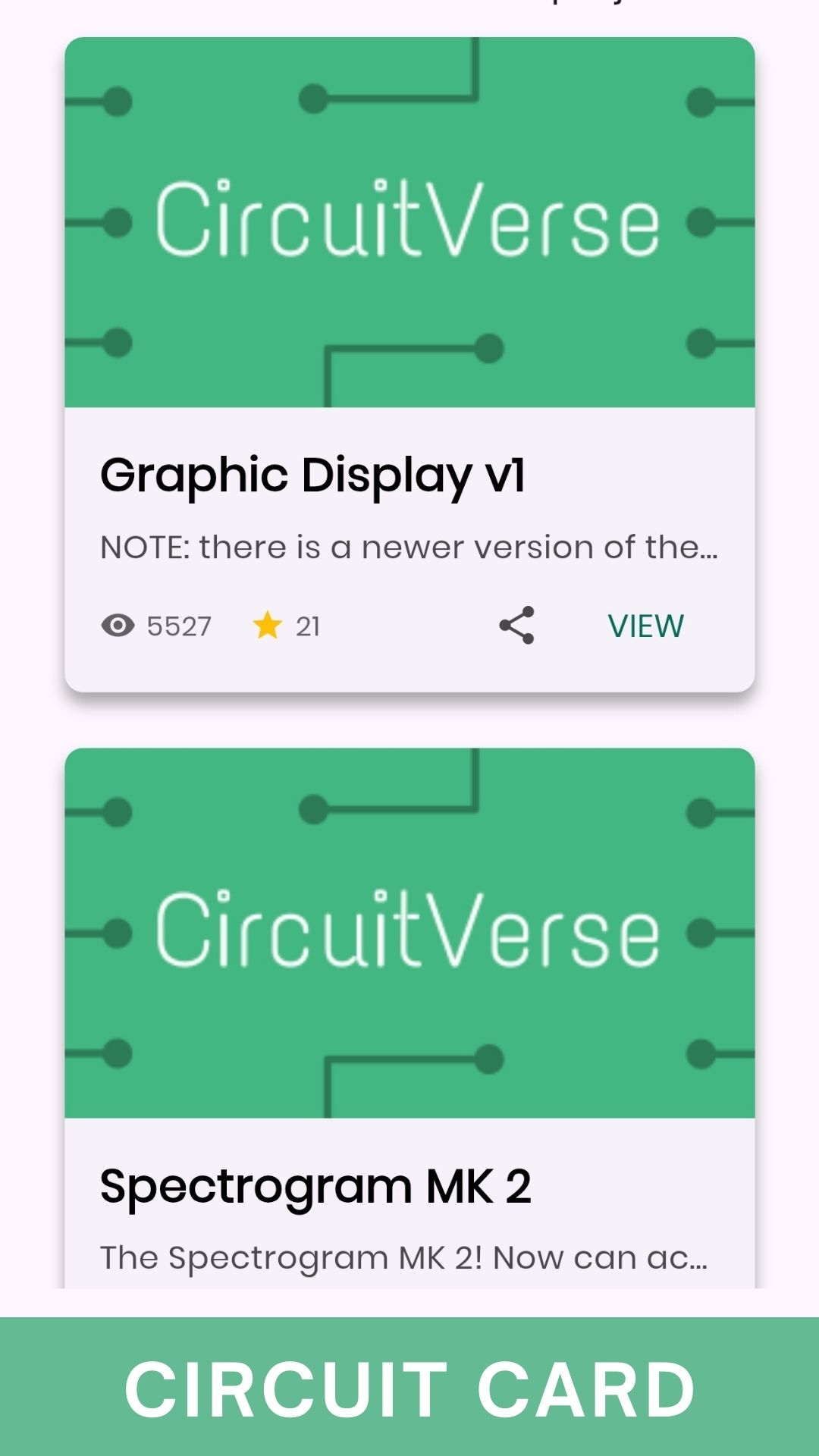
Featured Circuit Card
The Featured Circuit Card has been completely refreshed with a cleaner design, better spacing, and dark mode support. You’ll now see project stats like views and stars at a glance. For projects without images, a neat default image keeps things consistent.
And here’s the exciting part, we added a Share button, so you can send your favorite circuits to friends or your community instantly. Sharing circuits is now just one tap away.
Profile Card Revamp
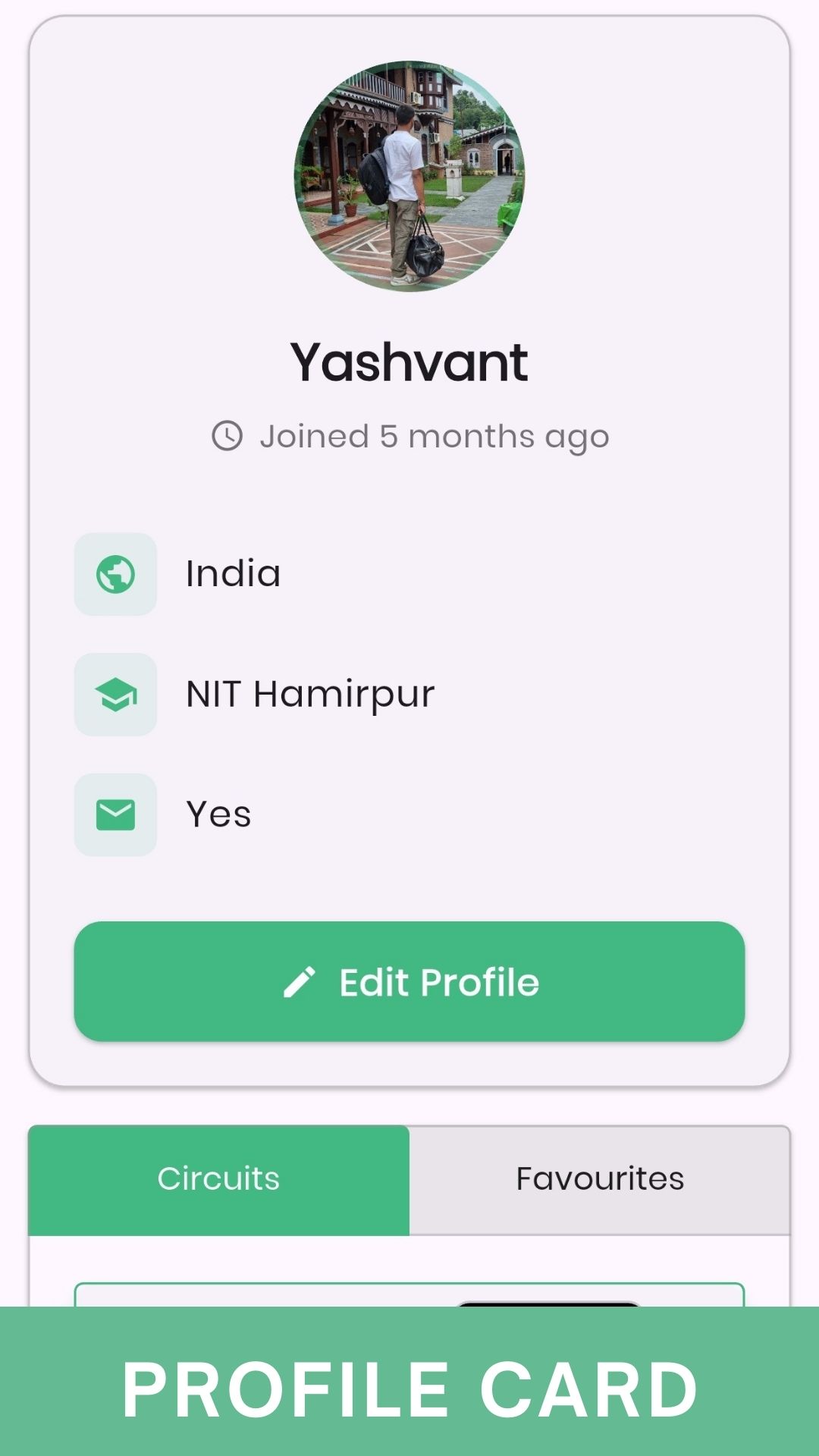
Profiles also got a modern redesign! The new Profile Card now comes with:
- A larger, styled profile picture with a decorative border
- Icons for country, education, and subscription details (instead of just plain text)
- Bigger, bolder fonts for better readability
- A smoother Edit Profile button with a clean, rounded look
These changes make the app feel more welcoming and polished, while keeping important information easy to find.
Together, these updates make CircuitVerse Mobile not only more functional, but also more enjoyable to use.
Smarter Project Details with Tags
Editing and viewing projects just got a whole lot smoother.
Now, when you go to edit a project, the form neatly pre-fills all your saved details, including the title, description, and access type. So, you don’t have to start from scratch. We also improved how descriptions load, making the editor feel more natural.
On top of that, we’ve added proper tags support. In the edit view, you’ll see a helpful hint guiding you on how to add tags. And once saved, tags show up beautifully in the project details screen as styled chips, making it easier to discover and categorize circuits.
With these improvements, projects are not only easier to manage, but also easier to share and explore.

A Better Simulator Experience
The simulator has always been at the core of CircuitVerse. It is where ideas come alive, circuits are tested, and projects take shape. With this update, we have made the simulator more powerful, more reliable, and better connected to the way you work.
Smarter Downloads and Media Support
Saving circuit images and files is now seamless across devices.
- On Android 13 and above, downloaded images are saved directly to the system gallery.
- The app intelligently detects file types: images, PDFs, or other files get the correct name and extension.
- The gallery updates instantly after downloads, so your circuit snapshots are visible right away.
These changes mean less friction and more reliability, especially when sharing and storing your work.
Projects and Simulator, Working Together
One of the most important features has been the ability to re-edit your projects. That is now possible.
- A new “Open in Simulator” button has been added to the project editing screen.
- With one click, the project launches directly into the simulator, ready for testing. No more switching screens or reloading manually.
- The editor itself also has improved spacing, making descriptions easier to read and edit.
Under the Hood
To support these updates, several technical improvements were made:
- Updated storage and media permissions for Android, with compatibility for older versions.
- Improved back navigation inside the simulator, so browsing feels natural.
- Enhanced routing so projects flow smoothly into the simulator without extra steps.
The simulator is the highlight of CircuitVerse, and these improvements make it more reliable, more integrated, and ultimately more enjoyable to use. Downloading circuits, managing files, and editing projects are no longer separate steps but part of a single, flowing experience.
A Simpler, Stronger CircuitVerse: Removing Facebook Login & Expanding Platforms
Over the last few weeks, I’ve been working on making CircuitVerse both lighter and more accessible. This update brings some meaningful changes that simplify how the app works, improve stability, and even expand the platforms you can run it on.
Authentication Updates
One of the major areas I worked on was fixing the authentication flow. During the contribution phase, everything worked smoothly, but while testing during GSoC, I noticed that logins were failing [Google and GitHub]. After exploring all possible causes, it narrowed down to the fact that the existing secrets were revoked or had expired.
To confirm this, I generated my own OAuth keys and verified that authentication was indeed working fine with fresh credentials. After a detailed discussion with Aboobacker and Hardik, we concluded that the issue was on the secrets side. Aboobacker is now coordinating with Hardik to get this resolved from the CircuitVerse side.
As part of this work, I also cleaned up the authentication system by removing the deprecated Facebook login support. This helps reduce dependencies and makes the login flow simpler and easier to maintain, while keeping Google and GitHub sign-ins fully functional and reliable.
Hello, Windows Desktop
One of the most exciting updates is that CircuitVerse can now run as a native Windows desktop app. With the necessary build configuration in place, Windows users are able to build and use CircuitVerse right from their desktops. This opens up CircuitVerse to an even wider community of learners and creators.
Improvements Behind the Scenes
Alongside these visible updates, a number of important technical improvements went in:
- iOS Minimum Version Raised: The deployment target is now iOS 12.0, ensuring compatibility with modern devices and libraries.
- Better Contributors API Handling: Contributor data now loads more reliably, thanks to a smarter parsing approach.
- Stronger Build System: Android APK artifacts in CI/CD are now streamlined and easier to manage, while iOS validation steps and updated project settings reduce build hiccups.
- Cleaner Project Structure: Old Facebook-related configuration was removed from Android and iOS builds, while platform-specific files like
.vscode/are now properly ignored. - More Stable Tests: We expanded our mock setups and improved image handling in tests, making our test suite both cleaner and more reliable.
Small Touches That Make It Feel Alive
Sometimes it’s not the big features, but the small details that truly shape how an app feels. This summer, I spent time adding those gentle touches that make CircuitVerse Mobile a little warmer and more human.
Now, when you tap a button, it responds with a subtle animation, a tiny moment of feedback that makes the action feel alive. Moving between screens feels smoother too, thanks to soft transitions that make navigation less like jumping and more like flowing.
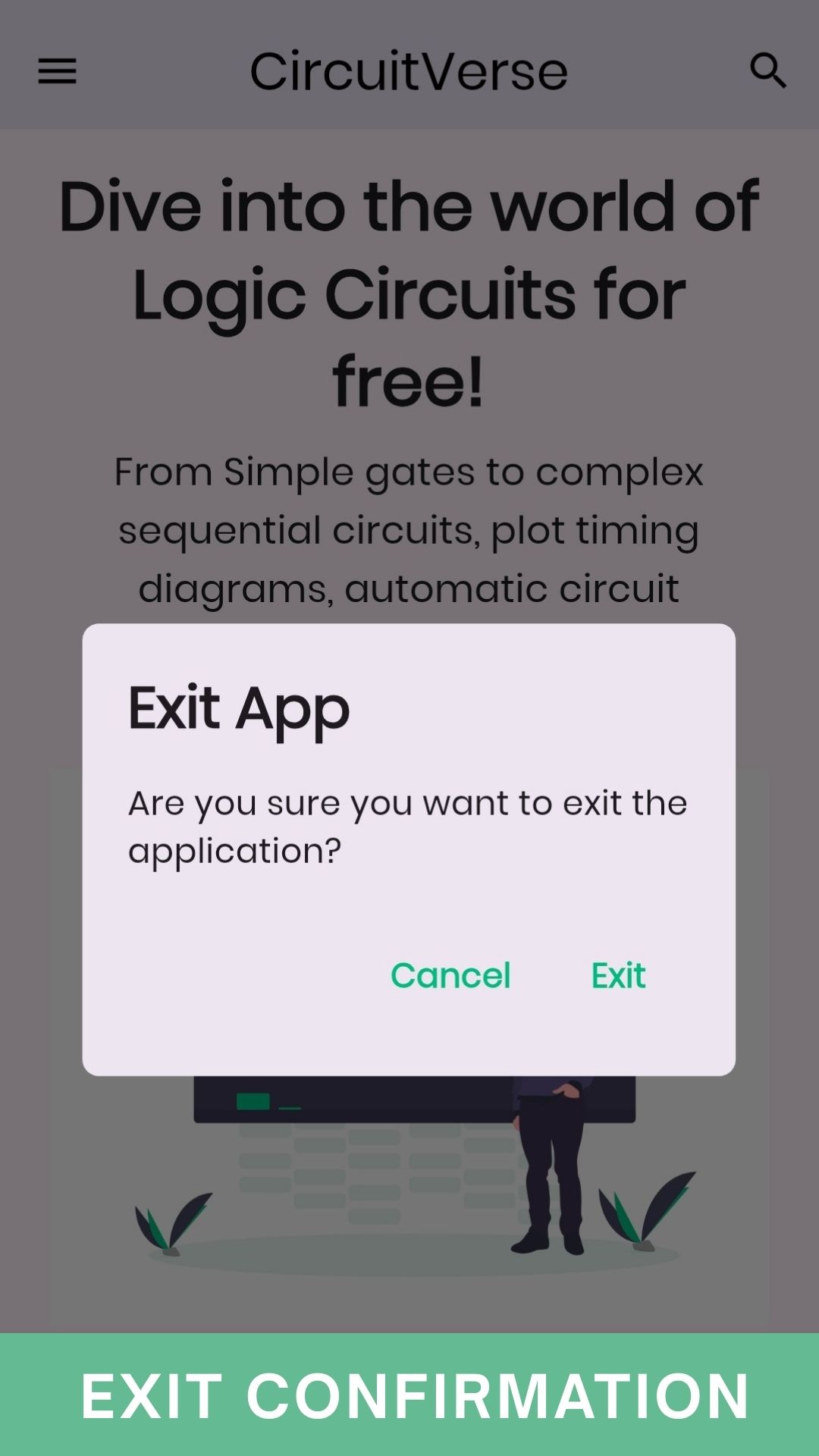
And to save you from the frustration of closing the app by mistake, there’s now an exit confirmation dialog, gently asking if you’re sure before leaving.
These may not sound like headline features, but together they create a sense of polish and care. They make the app friendlier, easier to trust, and just a little more delightful to use, because learning circuits should feel as smooth as it is powerful.
All Pull Requests
- fix(localization): resolve flutter_gen and imageBuilder errors #375
- Improved Profile Editing with Enhanced Typeahead and UI Fixes #378
- Modernized codebase for multilingual support #381
- Text capitalization and formatting #385
- Add RTL Language Support with Arabic Translations #391
- Enhance CI with automated releases #398
- Project re-editing feature #409
- User Profile View UI/UX design improvement #412
- Enhance Simulator Download & External Link Handling with Android 13+ Media Support #421
- Share button in the Featured Circuit Card #417
- Profile card revamp #411
- chore(images): optimize assets with Imgbot #407
- Featured circuit card #406
- chore: upgrade flutter_lints from 5.0.0 to 6.0.0 #405
- Project details pre-fills saved data and added tags #415
- Fix: Remove flutter_facebook_auth dependency #429
Project Board
Throughout the summer, the CircuitVerse Mobile App – GSoC 2025 project board became my go-to place. It wasn’t just a list of tasks, it was more like a living diary of the project.
Every card on the board told a small story: something waiting to be built, a feature in progress, a review happening with mentors, or the joy of finally moving it to “Done.” Watching tasks move across these columns gave me a real sense of progress and kept me motivated on tough days.
The board also made collaboration easy. Mentors could see what I was working on, and suggest improvements. It helped keep everything transparent, structured, and moving at a steady pace.
Looking back, this simple tool played a big part in keeping the project organized and, honestly, kept me grounded and focused throughout the journey.
Weekly Blogs
- Quick Open-Source Guide
- My GSoC Community Bonding Period with CircuitVerse
- Week 1 of GSoC: Learning Through Dependencies and Communication
- GSoC Week 2 — Languages, UX & 40 Failing Tests
- GSoC Coding Period Week 3
- GSoC Week 4: RTL Madness, OAuth Adventures & Markdown Mayhem
- GSoC Week 5: Markdown broke, CI/CD woke
- GSoC Week 6: Deep Diving into the Interactive Book Issue
- CircuitVerse Mobile App [Project 7 : Flutter Upgrade] [Phase:1 Report]
- GSoC Week 8: Linting Upgrades, UI Redesigns & Simulator
- GSoC Week 9: Bugs, Collaboration & a Few Funny Glitches
- GSoC Week 10 – The Week of… Well, Distractions
- GSoC Week 11: Nearing the Finish Line with CircuitVerse
- GSoC Week 12: Fading Transitions, Broken Builds & NASA Phones
Acknowledgements
This journey wouldn’t have been possible without the incredible people around me.
- To my mentors — Hardik, Aboobacker, and the entire CircuitVerse team — I am deeply grateful for your patience, guidance, and the countless moments of encouragement that kept me moving forward. A special thanks to Hardik for giving me so many “cool” moments, and for calmly handling my “paranoid” ones when I felt overwhelmed. And to Aboo, I genuinely enjoyed your subtle sarcasm. It always landed perfectly and brought lightness to our discussions.
- To the community members who reviewed my PRs, shared feedback, and cheered me on. You turned this into a truly collaborative and enjoyable experience.
- And to Google Summer of Code, for opening the door to such a meaningful opportunity and giving me the chance to live a dream I had held for so long.
I carry with me not just the code I wrote, but also the kindness, support, and shared spirit of open source that made this summer unforgettable.
Closing Thoughts
As I wrap up this chapter of GSoC 2025 with CircuitVerse, I carry with me not just the technical lessons but also the joy of building something meaningful for a community I deeply care about. Every feature added, every bug fixed, and every discussion with mentors and peers made this summer an unforgettable journey.
I’m grateful to my mentors, the CircuitVerse team, and the entire community for their guidance and encouragement throughout. Most of all, I’m excited for what lies ahead, to keep contributing, learning, and watching CircuitVerse reach even more learners across the globe.
And if I were to sum up my dream of GSoC and the effort I put into it, I’d borrow the words of Zakir Khan:
“Apni aukaat se bda, apni hasiyat se bda sochte rehna chahiye… kya pata upar wala dekh raha ho… aur keh de tathastu.”
Here’s to growth, collaboration, and the beautiful journey of open source!
See Also
- Migrate to View Components & Improve Search Experience: GSoC 2025 Final Report
- Project 1: Circuit Visibility Boosting & Platform Performance Enhancement - GSoC 2025 Final Report
- Desktop Application & Vue Frontend Updates: GSoC 2025 Phase 1 Report
- Migrate to View Components & Improve Search Experience: GSoC 2025 Phase 1 Report
- Project 1 Circuit Management & Performance Enhancement : GSoC 2025 Phase‑1 Report